Swissphone DE900 - Operating Instructions
Contents
- Display
- Keys
- Menu Structure
- Messages
- Alerting
- Alarm Clock
- Status Display and User Information
- Alarm Options
- Settings
- Switching-off/Switching-on


|
 |
Battery condition |
 |
No field strength |
 |
New message |
 |
Loud alerting Alarm |
 |
Silent alerting |
 |
Alarm clock on |
 |
Clock |
 |
Menu text |
 |
Position of the menu selection |
 |
Futher menus |
 |
Push scroll key to select the next menu |
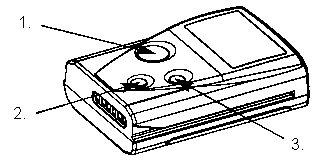
- Confirmation key: Read messages, confirm alarm, confirm selection.
- Return key: Alternately display user - and status information, leave selected menu or selected message.
- Scroll key: Display main menu, scroll through menus and messages, change settings.
Switching the Receiver On
By inserting the battery (refer to Changing the Power Source), the SWISSPHONE DE900 receiver is automatically switched on.
By puching the confirmation key, directly the message selection for the "Read messages" is displayed (boldface frame).
When pushing the scroll key, the main menu is displayed (boldface broken line frame).
| Main menu | 1st Sub-menu | 2nd Sub-menu |
|---|---|---|
| MESSAGES | Read | Message selection |
| Delete | Message selection | |
| Delete all | ||
| Protect | Message selection | |
| ALARM | Loud | |
| Silent | ||
| ALARM CLOCK | On / Off | |
| Set | ||
| Repeat | ||
| STATUS | User information | |
| Status display | ||
| ALARM OPTIONS | Alert-pattern | |
| Call reminder | ||
| SETTINGS | Clock | |
| Date | ||
| Language | ||
| Accu | ||
| SWITCH OFF | Are you sure? |


|
 |
Main address - Sub address |
 |
Time and date of the message received |
 |
Start of the message |
 |
Cursor |
 |
Unread messages with priority |
 |
Unread messages |
 |
Read messages |
 |
Protected messages |
 |
Free memory space |
Read Messages
A newly received message appears on the display immediately
- The alerting is stopped by pushing any key.
- By pushing the scroll key, you can read the message. Only once you have scrolled right through to the end of the message it is considered as read.
After the release time, the receiver reverts to the stand-by mode.
Read Message
Point of departure: Stand-by mode
- Push the confirmation key and the menu selection is displayed, whereby the cursor is positioned on the most recent message.
- Push the scroll key to select a message.
- Push the confirmation key to read the selected message. The first 3 lines of the message are displayed.
- Push the scroll key to read the whole message.
Read all messages with the confirmation key
You have the possibility of directly scrolling through - and reading all messages with the confirmation key.
Simple operation
If your receiver is configured for simple operation, then you directly get to the most recent message with the confirmation key.
As soon as you have read it, the next unread message is displayed.
In order to reach the main menu, push the scroll key and the return key simultaneously for at least 2 seconds.
Display illumination
In order to switch on the display illumination, push the confirmation key for 2 seconds.
Push the confirmation key again for 2 seconds to switch the display illumination off again.
At the latest when the receiver reverts to the stand-by mode, the display is automatically switched off.
Deleting an individual Message
Point of departure: Stand-by mode
- Push the scroll key and the menu "MESSAGES" is displayed.
- Push the confirmation key.
- With the scroll key, select the menu "Delete messages" and push the confirmation key.
- With the scroll key, select the message, which is to be deleted.
- Push the confirmation key to delete the message.
Deleting All Messages
Point of departure: Stand-by mode
- Push the scroll key and the menu "MESSAGES" is displayed.
- Push the confirmation key.
- With the scroll key, select the menu "Delete all messages" to delete all messages.
- Push the confirmation key.
- The question "Are you sure?" is displayed.
- Push the confirmation key to delete all messages or the return key to abort the process.
Protecting Messages
Point of departure: Stand-by mode
- Push the scroll key and the menu "MESSAGES" is displayed.
- Push the confirmation key.
- With the scroll key, select the menu "Protect messages".
- Push the confirmation key.
- Select the required message with the scroll key.
- Push the confirmation key to protect the selected message.
The alerting on principle differentiates between messages with priority and without priority. This depends on the configuration of the corresponding address. In the alerting menu, the SWISSPHONE DE900 can be configured for silent alerting or loud alerting:
Point of departure: Stand-by mode
- Push the scroll key and the menu "MESSAGES" is displayed.
- With the scroll key, select the menu "ALERTING".
- Push the confirmation key.
- With the help of the scroll key, select either alerting loud or alerting silent.
- Push the confirmation key to take over the required alerting mode.
The following table illustrates the alerting characteristics for the corresponding configuration.
| Setting | With priority | Without priority |
|---|---|---|
| LOUD |

Simultaneous start of vibration and acoustic signalling. |

Standard signalling. |
| SILENT |

+0 seconds vibration first, thereupon acoustic signalling in full length. |

Only vibration duration 10 seconds. |
Alert signal  Vibrator
Point of departure: Stand-by mode
- Push the scroll key and the menu "MESSAGES" is displayed.
- With the scroll key select the menu "ALARM CLOCK".
- Push the confirmation key.
Switching the Alarm On and Off
Point of departure: Menu alarm clock
- Push the confirmation key to select the menu "On/Off".
- Select On or Off with the scroll key.
- Take over your selection with the confirmation key.
Switching-off the alarm tone
As soon as any key is pushed, the alarm tone is switched off. After the alarm repeat time period, the alarm tone starts again.
If the confirmation key is pushed for at least 2 secs, the alarm tone is switched off for the whole day.
The alarm, however, remains switched on and will sound once again the next day.
Setting the Alarm Clock
Point of departure: Menu alarm.
- Push the scroll key to select the menu "Set alarm clock".
- Push the confirmation key.
- With the scroll key, set the hours and minutes and confirm respectively.
Alarm Repeat
Point of departure: Menu alarm
- Push the scroll key to select the menu "Alarm repeat".
- Push the confirmation key.
- With the scroll key, set the number of repeats and the time inverval in minutes and confirm respectively.
Status Display and User Information
Point of departure: Stand-by mode
- Push the scroll key and the menu "MESSAGES" is displayed.
- Select the menu "STATUS" with the scroll key.
- Push the confirmation key.


|
 |
Date |
 |
Alarm time |
 |
Number of unread messages |
 |
Number of read messages |
- If the scroll key is pushed, the user information is displayed, otherwise the SWISSPHONE DE900 receiver goes into the stand-by mode after the release time.
Direct display of the status screen and the user information:
If the receiver is in the stand-by mode, then by permanently pushing the return key the status information screen and the user information are alternately displayed for 2 seconds.
Point of departure: Stand-by mode
- Push the scroll key and the menu "MESSAGES" is displayed.
- With the scroll key, select the menu "ALARM OPTIONS".
- Push the confirmation key.
Alert Pattern
Point of departure: Menu Alarm options
- Push the confirmation key to select the menu "Alert pattern".
- With the scroll key, select a RIC with sub-address.
- Push the confirmation key.
- Select a melody with the scroll key. The melody is played during the selection.
- Push the confirmation key.
Call reminder
Point of departure: Menu Alarm options
- With the scroll key, select the menu "Call reminder".
- Push the confirmation key.
- Select between loud of discrete alarm with the scroll key.
- Push the confirmation key.
Point of departure: Stand-by mode
- Push the scroll key and the menu "MESSAGES" is displayed.
- With the scroll key, select the menu "SETTINGS".
- Push the confirmation key.
Setting the Clock
Point of departure: Menu settings
- Push the confirmation key to select the menu "Setting the clock".
- With the scroll key, set the hours and minutes and confirm respectively.
Setting the Date
Point of departure: Menu settings
- With the scroll key, select the menu "Setting the date".
- Push the confirmation key.
- With the scroll key, set the year, the month and the day and confirm respectively.
Language
Point of departure: Menu settings
- With the scroll key, select the menu "Language".
- Push the confirmation key.
- With the scroll key, select one of two languages.
- Push the confirmation key.
Selecting the Accu Type
The SWISSPHONE DE900 receiver automatically identifies, whether an alkaline battery or a rechargeable battery is installed.
The installed rechargeable battery type (NiMH or NiCd) can be configured here.
Please ensure, that the installed rechargeable battery type corresponds with the setting in the device.
This assures an optimum indication of the battery charge level.
Point of departure: Menu settings
- With the scroll key, select the menu "Battery selection".
- Push the confirmation key.
- With the scroll key, make the selection between NiMH and NiCd.
- Push the confirmation key.
Battery Condition Indication
|
 |
 |
 |
| 80% - 100% | 33% - 80% | 13% - 33% | 0% - 13% |
In the switched-on condition, the battery symbol is always visible on the display and indicated the still available amount of energy. The operating period can amount to up approx. 3000 hours dependent on the power supply source and the programmed operating mode. When the energy source is completely exhausted, the empty battery symbol blinks continuously and simultaneously a regular clicking sound is audible. In this condition, an operating time of at least 24 hours is still available. By pushing the confirmation key, the battery alarm is switched off, the empty battery symbol, however, continues to blink.
Changing the Power Source
Open the house cover on the rear side of the receiver. Insert the power source supplied into the compartment and in doing so pay attention to the correct polarity.
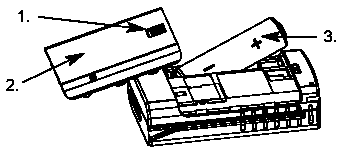
- Slide back the battery compartment locking bar.
- Remove the battery compartment cover.
- Insert the battery.
The following power source of the size AA, resp., L6, or AM3 (mignon) can be used:
- Alkaline: Leak-proof Alkaline - dry batteries.
- Rechargeable battery: Rechargeable batteries, either Nickel-Cadmium or Nickel-Metal-Hydride. For charging, for safety reasons please only utilise a charging unit from the original SWISSPHONE - accessories range for the SWISSPHONE DE900 receiver.
By inserting the battery, the SWISSPHONE DE900 receiver is automatically switched on. A system test follows by means of a brief activation of all consumers in the device. After this, the device is ready for operation.
Please note!
In order to have an optimum battery, resp., rechargeable battery condition indication, the type of the rechargeable batteries installed has to be set on the receiver through the device operation (please refer to selecting the type of rechargeable battery type).
Switching-off
Point of departure: Stand-by mode
- Push the scroll key and the menu "MESSAGES" is displayed.
- With the scroll key, select the menu "SWITCHING-OFF".
- Push the confirmation key. The question "Are you sure?" appears.
- Push the confirmation key once again to switch-off the receiver.
Switching-on
Push any key for a longer time period, in order to switch the receiver on.
Switching-on with Alarm Clock
If the alarm clock is switched on and the receiver is switched off, then the SWISSPHONE DE900 will be switched on at the time set and the alarm clock sounds.
In order to set the alarm clock, please refer to "Setting the alarm clock".